How to Turn a Prompt into a Whiteboard Explainer Video (With a Free Prompt Template)
Practical guidance for creators and marketers on turning one clear prompt into a structured visual story with an AI whiteboard video workflow.
Quick answer: to turn a prompt into a whiteboard explainer video, write a prompt that names your audience, the one idea you want them to understand, the examples to show on screen and the length you need. Paste it into an AI whiteboard video generator like KolaVid AI, choose a voice, language and format, and generate. The video is usually ready in a minute or two.
The tool does the drawing and narration. The prompt decides whether the result is clear or vague. Creators and marketers often need to explain the same idea again and again, and a well-written prompt turns that idea into a short visual story people can watch, remember and act on.
Below you'll find the step-by-step process, a copy-and-paste prompt template with a worked example, and the mistakes that most often lead to weak videos.
How to turn a prompt into a whiteboard video, step by step
Step 1: Choose one clear promise
Decide what the viewer should walk away knowing, and write it as a single sentence, for example: "After this video, you'll know why invoices get paid late and one fix that speeds them up." Every scene should support that promise. Anything that doesn't is a candidate for cutting.
Step 2: Pick a simple story shape
Whiteboard explainers work best with a familiar structure. A reliable one for marketing and product videos is:
- Pain point: the problem your viewer recognises
- Current workaround: what they do today and why it falls short
- Better approach: the idea, product or method you're explaining
- Next step: the one action you want them to take
For teaching, swap this for question → explanation → example → recap.
Step 3: Strip out the extra detail
If you're starting from notes or a document, treat it as raw material. Keep the parts that explain the problem, the process, the decision and the outcome. Drop the background, the caveats and anything you'd skip if you were explaining it out loud to a friend.
Step 4: Name what should appear on screen
Vague prompts tend to create vague scenes. Instead of asking for a video about "improving efficiency", list the objects you want to see: a pile of paper invoices, a clock, a phone with a payment notification. Concrete objects give the AI something to draw and the viewer something to remember.
Step 5: Generate the video
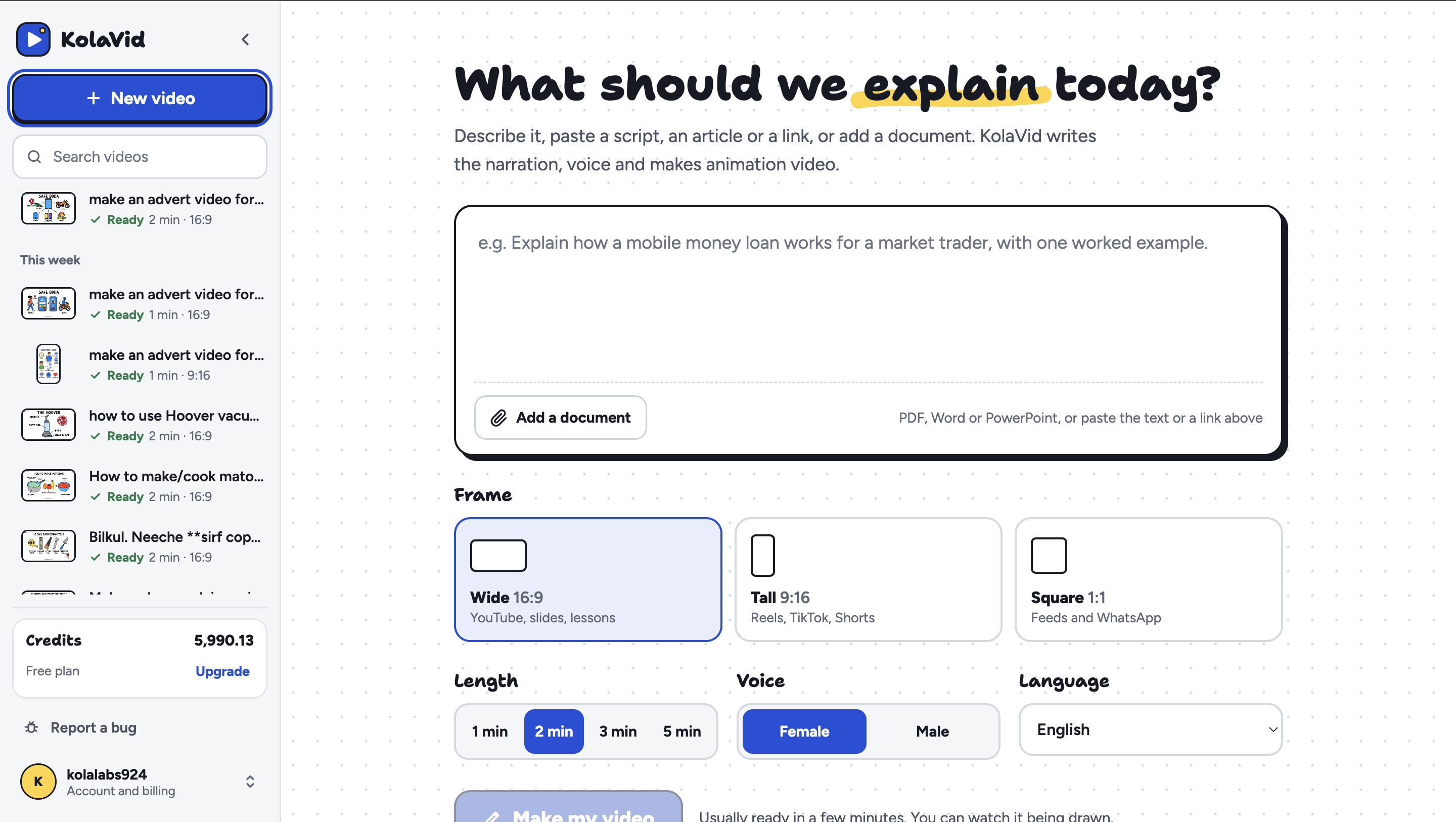
In KolaVid, click New video, paste your prompt, then choose:
- Format: 16:9 for YouTube and presentations, 9:16 for TikTok, Reels and Shorts, or 1:1 for square social posts
- Length: 1, 2, 3 or 5 minutes
- Voice: male or female narrator
- Language: your audience's language
Click Make my video. You'll see scenes appear as they're generated.
Step 6: Review and refine
Read your script aloud before generating, since long sentences tend to become slow scenes. After generating, check that each scene has one main object and one clear point. If a scene needs six labels to make sense, split it in two and regenerate.
Whiteboard video prompt template
Copy this template and fill in the brackets:
Create a [length]-minute whiteboard explainer video for [audience]. The viewer should come away understanding: [one-sentence promise]. Tone: [friendly / professional / playful]. Structure: [pain point → current workaround → better approach → next step]. Show these objects on screen: [3–5 concrete objects]. Key facts to include: [facts, numbers or quotes that must be accurate]. End with this call to action: [what the viewer should do next].
Example prompt
Here's the template filled in for a small accounting software company:
Create a 1-minute whiteboard explainer video for freelance designers. The viewer should come away understanding: sending invoices the same day you finish a job gets you paid faster. Tone: friendly and practical. Structure: pain point → current workaround → better approach → next step. Show these objects on screen: a finished design on a laptop, a calendar with weeks crossed off, a pile of unsent invoices, a phone with a payment notification. Key facts to include: invoices can be created and sent from a phone in under a minute. End with this call to action: try sending your next invoice the day you finish the work.
Notice what this prompt does: it names one audience, makes one promise, gives the AI four things to draw and ends with a single action. That's usually all a short explainer needs.
Common prompt mistakes (and how to fix them)
| Mistake | What happens | Fix |
|---|---|---|
| Covering several ideas at once | Scenes feel rushed and nothing sticks | One video, one promise. Make a series instead |
| Using abstract words like "growth" or "innovation" | The AI has nothing concrete to draw | Name real objects the viewer will recognise |
| Pasting a whole document unedited | The video sounds like a summary, not a lesson | Keep the problem, process, decision and outcome |
| Writing long, formal sentences | Narration drags and scenes feel slow | Write the way you'd explain it out loud |
| No call to action | Viewers enjoy it, then do nothing | End with one specific next step |
A quick test before you publish: watch the video once with the sound off. If the visuals still tell the story in order, your prompt did its job.
Frequently asked questions
What should a whiteboard video prompt include?
At minimum: who the video is for, the one idea they should understand, the objects that should appear on screen and the length. Adding tone, key facts and a call to action makes the result noticeably sharper.
How long should a prompt be?
Most good prompts are 5 to 10 lines. Short enough to stay focused, detailed enough that the AI doesn't have to guess.
Can I use a script instead of a prompt?
Yes. If you've already written the narration, paste the script in directly. KolaVid also accepts documents and web links if your content already exists somewhere else.
How long does it take to generate the video?
With KolaVid, usually one to two minutes. Writing a good prompt takes longer than the generation.
What's the best length for a whiteboard explainer?
For social media and ads, 1 minute is usually enough. For product explainers and lessons, 2 to 3 minutes gives room for an example. Save 5 minutes for topics that genuinely need a step-by-step walkthrough.
Final thoughts
Turning a prompt into a whiteboard explainer video isn't about pressing a button and hoping. It's about shaping the explanation first, then letting AI take care of the repetitive production work.
If you have an idea you find yourself explaining over and over, grab the template above, fill it in, and run it through KolaVid AI. The free plan is enough to see how your prompt turns into a finished video.