Sales Explainer Video: A 90-Second Structure
A sales explainer video should start with the buyer's problem, not your product. A 90-second structure, a script to copy, and how to use it in outreach.
A sales explainer video should spend its first half on the customer's problem and only then show your product. Buyers keep watching when they recognise their own situation in the first 15 seconds; they stop when the video opens with your logo and a feature list. A 90-second structure works well: the situation, what it costs them, the change that fixes it, how your product makes that change, and one next step.
Below: the difference between an explainer and a demo, the structure with a full script, and the two places these videos earn their keep, outreach and the follow-up after a call.
Sales explainer video or sales demo video?
The two get mixed up, and they do different jobs.
- A sales explainer video answers "why should I care?" It describes a problem, explains why it happens and shows the idea behind the fix. It works before the buyer has agreed to talk to you.
- A sales demo video answers "how does it work?" It walks through the product itself: screens, steps, settings. It works once the buyer is already interested.
Most teams make the demo first because it is easier: point a screen recorder at the product and talk. But a demo sent to someone who has not yet admitted the problem is a tour of a house they did not ask to visit. Keep your demo, and put the explainer in front of it.
Why the problem comes first
People notice their own problems, not your features. "Automatic payment reminders" is a feature. "You finished the job three weeks ago and you are still waiting to be paid" is a Tuesday evening they remember.
The video gets forwarded. Your contact rarely buys alone. They forward it to a manager or partner who was never on your call, so the video has to bring the context with it. A problem-first video makes sense to a stranger; a feature tour does not.
A clear problem makes the product obvious. If the viewer agrees with the first 35 seconds, your product section feels like the natural answer instead of a pitch.
The 90-second sales explainer structure
Narration runs at roughly 130 to 150 words a minute, so 90 seconds is about 200 to 220 words. That is short. Every line has to carry weight.
| Time | Part | What it does |
|---|---|---|
| 0-15 s | The situation | A specific moment the buyer will recognise. No company name yet. |
| 15-35 s | The cost | What the situation costs them: time, money, stress, missed chances. Concrete, not dramatic. |
| 35-55 s | The change | The idea that fixes it, in one or two sentences. Still no product. |
| 55-75 s | How your product does it | Two features at most, each tied back to the cost. |
| 75-90 s | One next step | A single, small ask. |
A few rules make the structure work:
- Write the situation from the buyer's chair. Use "you". Describe what they see and do, not what your software does.
- Keep the cost honest. Do not invent figures. If you have a real number from your own customers, use it and be ready to show where it came from. If not, describe the cost in plain terms ("evenings spent writing reminder texts").
- Make the change an idea, not a product. "Send the invoice before you leave the job" is a change. "Our invoicing module" is not.
- Ask for one thing. A short call, a reply, a free trial. Not all three.
Worked example: a script to copy
Here is the structure applied to an invoicing and payment-reminder tool for small trade businesses: plumbers, electricians, decorators. Swap in your own buyer and product; keep the shape.
Buyer: owner of a two-to-ten-person trade business who does their own admin. Goal: they reply to book a short call.
[The situation, 0-15 s]
You finish a job on Friday. The customer says they'll pay next week. Three weeks later you're still waiting, and you're the one who has to ask.
>
[The cost, 15-35 s]
For a small trade business, chasing payment is unpaid work. Your evenings go on writing reminder texts. Some invoices never go out at all, because the paperwork waits for the weekend. And every late payment is money you've already spent on parts and fuel, while your own suppliers still want paying on time.
>
[The change, 35-55 s]
The fix isn't chasing harder. It's sending the invoice before you leave the job, and letting polite reminders go out on their own, on a schedule you set once. No awkward phone calls.
>
[How the product does it, 55-75 s]
That's what our app does. Tap "finish job" on your phone and the invoice goes out with a payment link. If it isn't paid, a reminder follows on the day you chose. You see who has paid, and who hasn't, on one screen, from the van, between jobs.
>
[One next step, 75-90 s]
If chasing money eats your evenings, reply to this email and we'll set up your first invoice together on a short call.
That is about 185 words, which leaves room for pauses and for the drawings to land. Read it aloud with a timer before you produce anything. If you trip over a sentence, the viewer will too.
What goes on screen
A drawn explainer suits this structure because each idea can appear as it is spoken. A simple board plan for the script above:
- A van outside a house, then a calendar with weeks crossed off.
- A phone with a reminder text being typed at night, a pile of unsent invoices, a fuel pump.
- An invoice leaving a phone at the door of the house, and a clock with an envelope beside it.
- A phone with a "finish job" button, an invoice with a payment link, a list with ticks and crosses.
- An envelope with a reply arrow.
Notice that the product does not appear until board 4. By then the viewer has already agreed with the problem.

Using the video in outreach
A sales explainer video works best as a link inside a short, personal message, not as the message itself.
- Personalise the email, not the video. One line about the prospect's business ("I saw you added a second van this spring") does more than a custom video for every lead.
- Say why you are sending it. "This 90-second video shows the problem we fix, in case it sounds familiar" sets the expectation and the length.
- Send a link, not an attachment. Large attachments get caught by filters. Use a still frame of a board with a play symbol as the preview.
- Make a vertical version for phones if your buyers read LinkedIn or WhatsApp on the move.
- Measure replies, not views. A reply tells you the problem section landed.
One video per buyer type is usually enough. If you sell to owners and office managers, write two problem sections and keep the product section the same.
Using it after a sales call
The follow-up is where a sales explainer often does the most good, because your contact now has to convince someone else.
Make a recap for the person who was not on the call. Your champion has to explain you to their manager. Give them a two-minute video that does it for them: the problem, the change, how your product fits, and the next step you agreed.
Use the buyer's own words. If they said "we lose the whole of Sunday to invoices", put that sentence in the situation section. Avoid jargon they never used: if they say "chasing payment", do not say "accounts receivable".
Answer the objection you heard. If the same concern comes up on several calls ("we tried an app and the team never used it"), make a short video that answers it, and send it whenever that concern appears.
Send it within a day. A recap that arrives a week later reads like a newsletter.
For more on writing for a product audience, our guide to startup product demo videos covers the demo side, and whiteboard videos for marketing covers ads and landing pages.
Making a sales explainer in KolaVid
KolaVid turns a prompt, pasted script, document or web link into a narrated whiteboard video, with each drawing appearing as the narrator says it. Paste the spoken lines of the script above, without the bracketed labels, and add one line about the viewer: "Sales explainer for owners of small trade businesses. Friendly, plain tone. End with the reply ask." Or attach your one-page sales sheet with Add a document and ask for a problem-first explainer from it.
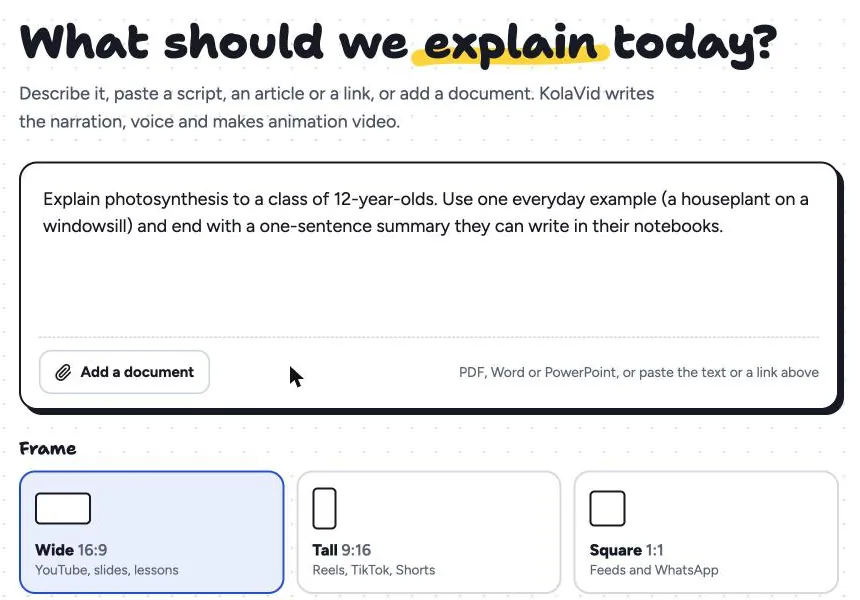
Choose Wide 16:9 for email and your website, or Tall 9:16 for LinkedIn and WhatsApp on phones. Lengths come in 1, 2, 3 and 5 minutes; for a 90-second script, choose 2. Brands named in the script are drawn with their own logo, which helps when you mention a tool your buyer already uses.
A few honest notes for sales use. Free videos carry a small KolaVid mark, which you may not want in a prospect's inbox; paid plans start with Starter at $19.99 a month. There is no editing timeline, so you change the script and make the video again. And there is no presenter or avatar: if you want your face in the outreach, record a short personal intro yourself and send both. The marketing page has sample videos, and the guide to turning a script into a whiteboard video covers how to format what you paste.
FAQ
How long should a sales explainer video be?
For first-touch outreach, 60 to 90 seconds. That is long enough to set up a problem and an answer, and short enough to watch between meetings. A recap after a call can run two minutes, because the viewer already has a reason to watch.
Should I personalise every sales video?
Usually not. Personalise the message that carries the video, and make one video per buyer type. A well-written problem section already feels personal to the right buyer.
Is a whiteboard video better than a screen-recorded demo?
They do different jobs. A drawn explainer is better for the problem and the idea behind the fix, because it can show things a screen cannot: a van, a calendar, a late payment. A screen recording is better once the buyer wants to see the actual product. Many teams send the explainer first and the demo second.
Write the first 15 seconds today
Take your best customer conversation, write down the moment they described just before they bought, and turn it into the opening of a 90-second script. Fill in the other four parts from the table above. If you want to see it drawn without recording anything, a free KolaVid account includes enough credits for one 2-minute video, no card needed.