Doodly Alternatives: 5 Online Whiteboard Tools Compared
Doodly is a desktop app with no browser version. Five online Doodly alternatives for whiteboard animation, compared on AI help, yearly cost and free options.
Doodly is installed software for Windows and Mac; its site lists no browser version and no mobile or tablet app. If you want to make Doodly-style whiteboard animation online, the main alternatives are VideoScribe (browser or installed, same projects), InstaDoodle and Powtoon (browser only), Animaker (browser, with an AI whiteboard maker) and KolaVid (browser, makes the whole narrated video from text). Doodly is still a good buy if you like building every scene by hand and want unlimited videos for one yearly price.
Below: what Doodly does today, what actually changes between a desktop app and a browser tool, and the five alternatives compared. Features and prices were checked on each vendor's own site on 28 October 2026.
Is there a Doodly online version?
Not as of 28 October 2026. Doodly's pricing page describes it as a desktop application for Windows (Windows 7 or later) and Mac (OS X 10.10 or later). It does still need an internet connection, because it pulls images from the internet and saved projects from the cloud. Voomly's Doodly FAQ, updated in May 2026, says there is no mobile or tablet app.
So "Doodly online" really means one of two things: Doodly itself, installed and connected to the internet, or a whiteboard tool that runs in a browser tab. The rest of this guide is about the second.
What Doodly does well
Doodly is a hand-built doodle video maker. You drag a character, prop or background onto the canvas and Doodly draws it in with a hand. Its homepage lists:
- Four board styles: whiteboard, blackboard, glassboard and green screen.
- Characters and props: the Standard plan includes 1,164 character images and 1,620 props; Enterprise has 3,959 characters and 3,341 props. Both include 84 scene templates.
- Smart Draw: upload your own image and Doodly works out how to draw it.
- Audio: record a voice-over inside Doodly or import one, and use the royalty-free music tracks.
- No video limit: Voomly's FAQ says there is no limit to how many videos you can create, and you can install it on more than one computer.
Pricing (doodly.com/doodly-pricing, checked 28 October 2026): Doodly Standard is $49 a month or $490 a year; Enterprise is $79 a month or $790 a year. Voomly's support page says Standard comes with Voomly Cloud and Enterprise with Voomly Pro. There is a 14-day free trial and a 30-day money-back guarantee. Doodly's homepage also showed a short-term special-offer price when we looked, so check what is on offer the day you buy.
AI. We did not find an AI feature inside Doodly on its own site. A Voomly blog post from 2024 shows how to customise Doodly characters with outside tools (ChatGPT and Freepik) and bring them back in.

Desktop app or browser: what actually changes
The difference is bigger than where the icon lives. Here is what to think about.
- Which computers you can use. An installed app needs a supported Windows or Mac computer. A browser tool works on most laptops, including a Chromebook or a borrowed school machine, as long as the browser is up to date.
- Internet either way. Doodly needs a connection for images and saved projects, and browser tools need one all the time. Neither is a true offline option, so this is rarely the deciding factor.
- Where projects live. Doodly saves projects to the cloud and syncs them to your installs. Browser tools keep everything online, so you can start at work and finish at home.
- Updates. Doodly's pricing page calls it a hybrid web and desktop app that pushes updates to the installed program. Browser tools update when you reload the page.
- Heavy projects. Long videos with many scenes depend on your computer's power in an installed app. Browser tools vary: some render on their own servers, which spares an older laptop.
- IT rules. Some schools and companies block software installs. A browser tool can be the only option there.
If none of these is a problem for you, the desktop question is not a reason to switch. The better reasons are AI help, cost or the time each video takes.
Doodly alternatives at a glance
Checked on each vendor's own site on 28 October 2026. Prices change often, so confirm before you buy.
| Tool | Runs where | How you build a video | AI help | Free option | Cheapest paid plan |
|---|---|---|---|---|---|
| Doodly | Installed app, Windows and Mac | Drag doodles onto a canvas, set timing | None on its site | 14-day trial, 30-day refund | Standard $49 a month or $490 a year |
| VideoScribe | Browser or installed app, synced | Place library images, set timing | AI script, images; AI voice on Core and Max | 7-day trial, no card, watermarked | Lite £130 a year |
| InstaDoodle | Browser | AI draws elements; you arrange scenes | AI doodle elements, AI voices | No trial; 60-day refund | See their pricing page |
| Powtoon | Browser | Templates plus hand-drawn elements | AI scripts, voice, doc-to-video | Up to 3 minutes, 720p, watermark | Lite $15 a month billed yearly |
| Animaker | Browser | AI draft from a prompt, then editor | AI scenes, characters, voice | Free plan with watermark | See their pricing page |
| KolaVid | Browser | Prompt, script, document or link to a finished video | Writes, draws and narrates | One 2-minute video, no card | Starter $19.99 a month |
Five Doodly competitors, one by one
VideoScribe: closest to Doodly, in the browser too
VideoScribe works the way Doodly does: choose images, place them on a canvas, set how long each takes to draw, add a voice and music. Its download page says the browser version and the installed app for Windows and Mac are the same product, with projects kept in sync. Lite is £130 a year with 5 downloads a month and videos up to 5 minutes; Core (£200 a year) and Max (£275 a year) add AI voice-over minutes and a library of about 5 million images. The 7-day trial needs no card. Our VideoScribe alternatives guide compares it in more depth.
Choose it when you like Doodly's way of working but want to switch between browser and desktop.
InstaDoodle: doodles drawn by AI
InstaDoodle is a cloud app; its FAQ says there is nothing to install and it runs on Mac, Windows or any device with a modern browser. You type an idea and its AI draws a character, object or background in doodle style, then you place the pieces into scenes. It lists 1,000+ doodle assets. There is no free trial, and the site offers a 60-day money-back guarantee. We saw both monthly plans and a one-time checkout price, so see their pricing page.
Choose it when Doodly's library never quite has the picture you need.
Powtoon: templates in a browser
Powtoon is a browser-based editor where whiteboard is one of several looks. It offers hundreds of whiteboard templates, hand-drawn elements, an automatic drawing effect and AI tools for scripts, narration and turning documents into whiteboard scenes. The free plan makes videos up to 3 minutes at 720p with a watermark; Lite is $15 a month billed yearly, with 5 watermark-free exports a month. See our Powtoon alternative guide.
Choose it when you want to start from a template rather than an empty canvas.
Animaker: an AI draft to edit
Animaker's AI whiteboard maker asks for a category and a prompt, asks you a few follow-up questions, and drafts scenes, characters, voice-over and lip sync. You can then edit everything in its editor. It lists 100+ whiteboard templates and over 2,000 AI voices. The free plan exports with a watermark; its paid prices were inconsistent across its own pages when we checked, so see their pricing page.
Choose it when you want AI to do the first pass but still want a Doodly-like level of editing.
KolaVid: the finished video from text
KolaVid is our own tool. It runs in the browser and makes the whole narrated whiteboard video from a prompt, a script, a document or a link. It is a different kind of tool from Doodly: there is no canvas to arrange. More below.
Choose it when you want the explanation finished and would rather not animate at all.
What a year costs
If you make videos all year, compare yearly totals. Cheapest paid plan for one person, from each vendor's site on 28 October 2026:
| Tool | Cheapest paid plan for a year | What limits you |
|---|---|---|
| Doodly Standard | $490 billed yearly ($588 if paid monthly) | No video limit |
| VideoScribe Lite | £130 billed yearly | 5 downloads a month, 5-minute videos |
| Powtoon Lite | $180 ($15 a month billed yearly) | 5 watermark-free exports a month, 10-minute videos |
| KolaVid Starter | $239.88 ($19.99 a month, billed monthly) | 5,000 credits a month, about 83 minutes of video; 5-minute videos |
| InstaDoodle, Animaker | See their pricing pages |
Doodly comes out well if you make many videos, because there is no cap on how many. The cheaper plans elsewhere cap downloads or minutes, so divide the yearly price by the number of videos you will actually finish.
Moving from Doodly without starting over
You cannot open a Doodly project in any of these tools, but most of the work in a good doodle video is the script, and that moves with you.
- Export your scripts. Copy the voice-over script of each video you might remake into one document.
- Mark one idea per scene. Put a line break wherever the picture should change. That is the structure every whiteboard tool needs.
- Keep your audio if you like it. Doodly lets you record your own voice, and many editors accept an uploaded voice-over, so check this before you switch. KolaVid narrates with its own female or male voices.
- Remake one video first. Pick a short one, rebuild it in your shortlist tool, and compare the time spent and the result before moving everything.
Our script to whiteboard video guide shows how to tidy a script so drawings land on the right words.
Making a Doodly-style video with KolaVid
In KolaVid you start with words instead of a canvas. Type a topic, paste a script or text, upload a PDF, Word or PowerPoint file, or add a web link. If you paste your own script, it is narrated as written, with drawings made to match. Each drawing appears as the narrator says it, one idea a board.
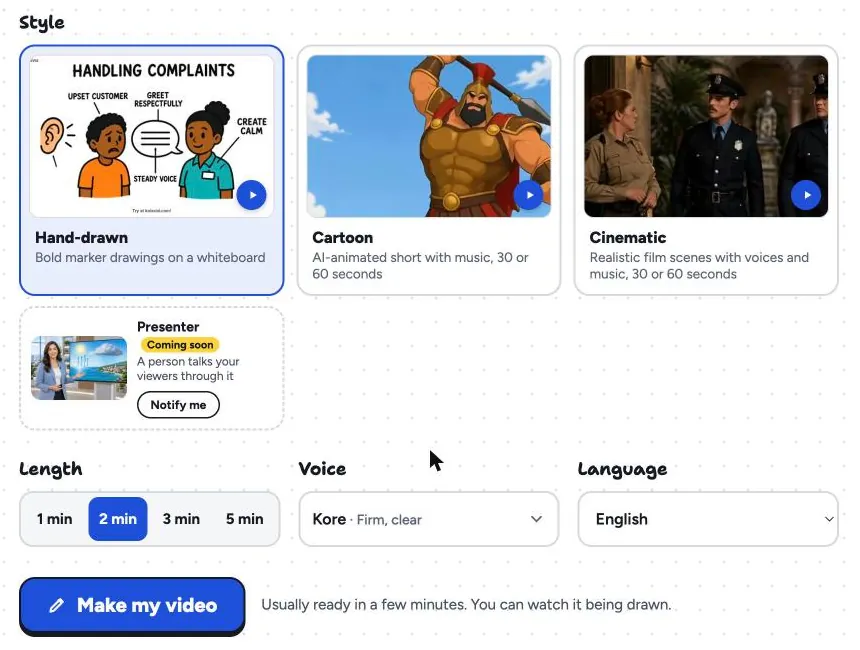
Choose the hand-drawn style, a 16:9, 9:16 or 1:1 frame, a female or male voice, the narration language and a length of 1, 2, 3 or 5 minutes. The video is usually ready in a few minutes and you can watch it being drawn, then download the MP4 or share a link.
What it does not do: there is no canvas or editing timeline, no image library and no team seats, and videos stop at 5 minutes. If you want to arrange each scene yourself, Doodly or VideoScribe will suit you better. Whiteboard video uses 1 credit a second; the free account's 120 credits make one 2-minute video with no card, with a small KolaVid mark. Try it from our AI whiteboard video maker page.
FAQ
Can I use Doodly online in a browser?
No. As of 28 October 2026 Doodly is an installed app for Windows and Mac that needs an internet connection, and there is no mobile or tablet app. For a browser tool that works in a similar way, look at VideoScribe; for AI help, InstaDoodle, Animaker or KolaVid.
Is Doodly a one-time purchase?
Its pricing page lists subscriptions: Standard at $49 a month or $490 a year, Enterprise at $79 a month or $790 a year. Its homepage showed a limited-time offer when we checked, so read the terms of any deal before you buy.
Does Doodly have AI?
We did not find a built-in AI feature on Doodly's site. Voomly has published a guide to editing Doodly characters with outside AI tools. If you want AI in the tool itself, InstaDoodle draws doodles from prompts, Animaker drafts whole videos, and KolaVid makes the finished video.
What is the cheapest Doodly alternative?
For a year of use, VideoScribe Lite (£130) and Powtoon Lite ($180 billed yearly) cost less than Doodly Standard ($490), but both cap exports. KolaVid's free account makes one 2-minute video with no card, and Powtoon has a free plan with a watermark.
When is Doodly the better choice?
When you want to place every doodle yourself, like the blackboard and glassboard looks, want to record your own voice, prefer installed software, or make so many videos that an uncapped plan works out cheapest. Doodly is a trademark of its owner, and KolaVid is not connected with it.