How Long Should an Explainer Video Be? Lengths by Goal
How long an explainer video should be for ads, homepages, lessons, training and YouTube, with script word counts per length and a way to split long topics.
Most explainer videos work best at 60 to 90 seconds when they sell, 2 to 3 minutes when they teach one thing, and no more than about 5 minutes for any single idea. The right explainer video length depends on where the video plays and what the viewer should do afterwards, not on how much you have to say. At a normal speaking pace of 130 to 150 words a minute, a 90-second video needs only about 200 to 220 words of script.
Below: a length guide by purpose and channel, the word count for each length, how to tell when a video is too long or too short, and a worked example of splitting one long topic into a short series.
Explainer video length by purpose
Treat these as starting points, not rules. They come from how people watch each kind of video: whether they chose to watch it, how much they need to learn, and what they are doing at the time.
| Purpose | Where it plays | Good starting length | Script words (about) |
|---|---|---|---|
| Ad or teaser | Social feeds, pre-roll | 15 to 45 seconds | 35 to 110 |
| Homepage or product explainer | Top of a website or landing page | 60 to 90 seconds | 130 to 220 |
| Feature or how-it-works video | Product pages, help centre, sales follow-up | 90 seconds to 3 minutes | 200 to 450 |
| Lesson on one concept | Class, LMS, homework link | 2 to 5 minutes | 260 to 750 |
| Training on one procedure | LMS, Teams channel, staff chat group | 2 to 3 minutes | 260 to 450 |
| YouTube teaching video | Your channel, search results | 2 to 8 minutes, or a series | 260 and up |
The pattern is simple. The less the viewer has chosen to be there, the shorter the video must be. Someone scrolling a feed gives you seconds. A student who clicked a lesson link from their teacher will give you a few minutes, as long as every minute teaches something.
Why shorter usually wins
A shorter explainer is not better because people have short attention spans. It is better because it forces you to choose. When you only have 90 seconds, you cannot explain five features, so you pick the one that matters and explain it properly.
Short videos also have practical advantages:
- They are easier to finish. A viewer who sees a 1:15 runtime presses play more readily than one who sees 7:40.
- They are easier to update. When a price, a screen or a procedure changes, you remake one short video instead of re-editing a long one.
- They are easier to reuse. A 60-second explainer fits a homepage, a sales email, a social post and a help article.
- They show you what you really know. If you cannot explain the idea in two minutes, the problem is usually the explanation, not the length.
The trap is cutting so hard that the video stops explaining. A 30-second "explainer" that names a problem and a product but never shows how it works is an ad, which is fine if that is what you wanted.
When a longer explainer is the right call
Go longer when the viewer has already decided to learn, and the extra time carries real content. Good reasons include:
- A worked example. Showing one calculation, one customer case or one experiment step by step takes time, and it is often the part people remember.
- Steps that depend on each other. A process where step 4 only makes sense after step 2 is hard to split.
- A viewer who searched for it. Someone who typed "how does a heat pump work" wants the whole answer, not a teaser.
- A follow-up for a complex sale. A prospect comparing options after a demo may welcome a three-minute walkthrough.
Bad reasons: you have a lot of material, you paid for a five-minute plan, or the topic "feels important". Length should follow the job of the video.
Explainer video length by channel
Ads and social feeds
Feeds reward a clear point in the first seconds. Keep ads and teasers between 15 and 45 seconds, use a vertical 9:16 or square 1:1 frame, and say the problem in the first sentence. Many people watch with the sound off, so if your video is narrated, add captions where the platform allows it. Platform limits change often, so check the current maximum length before you plan.
Homepage and landing pages
A homepage video is for someone deciding whether you are worth their time. Aim for 60 to 90 seconds: the problem, what you do, one example, and the next step. If you need longer, you are probably explaining features that belong on their own pages. Our guide to whiteboard videos for marketing covers where each type of marketing video fits.
Lessons and courses
For a lesson, one concept per video is the rule that matters most. Two to five minutes is usually enough for one idea and one worked example. A 20-minute lecture recording can still be useful, but students rewatch short videos far more easily when they revise a single point.
Training and onboarding
Training videos should cover one procedure each, at two to three minutes. Staff often watch them when they need them, on a phone, in the middle of a shift. A set of short videos also makes onboarding easier to update, as our guide to employee onboarding videos explains.
YouTube
YouTube viewers often arrive from search with a question. A 2 to 8 minute video that answers it fully is a reasonable range for teaching content. For a big subject, a playlist of short videos is easier to watch than one long one, and each video can target its own question. Our YouTube whiteboard explainer guide has more on structure and Shorts.
Turning a length into a script
Most length problems are script problems. Decide the length first, then write to the word count. Read the script aloud with a timer before you make anything; that test catches more problems than any edit later.
| Video length | Words at 130 to 150 a minute | What fits |
|---|---|---|
| 30 seconds | 65 to 75 | One problem and one claim |
| 60 seconds | 130 to 150 | Problem, answer, one example |
| 90 seconds | 200 to 220 | Problem, answer in two or three steps, example, next step |
| 2 minutes | 260 to 300 | One idea taught with a short worked example |
| 3 minutes | 390 to 450 | One idea, a longer example and a common mistake |
| 5 minutes | 650 to 750 | One idea taught in depth, or two closely linked steps |
A 60-second explainer outline you can copy
- The problem (about 20 words). Say it the way the viewer would: "Chasing unpaid invoices eats your Friday afternoons."
- What you do (about 25 words). One sentence on the answer, in plain words.
- How it works (about 50 words). Two or three steps, each one a picture.
- One example (about 30 words). A real situation with a real number.
- Next step (about 15 words). One action only.
A 3-minute lesson outline you can copy
- The question students would ask (one or two sentences).
- The idea in one plain sentence.
- Why it works, in two or three short steps.
- One worked example, done slowly.
- The common mistake, and how to avoid it.
- A one-line recap they can repeat.
If your draft runs over, cut in this order: background the viewer does not need, a second example, then any list longer than four items.
How to split a long topic into a series
When a topic will not fit, split it. Do not speed up the narration or pack more onto each scene.
Here is a worked example. A small software company has a nine-minute draft called "How our invoicing app works". It covers what the app does, sending an invoice, automatic reminders, taking card payments and the monthly report. Nobody will watch nine minutes on a homepage, and the help centre needs the parts separately anyway.
Split it by the question each part answers:
- "What does this app do for me?" 75 seconds, homepage. Problem, answer, one example of an invoice that pays itself.
- "How do I send my first invoice?" 2 minutes, onboarding email and help centre.
- "How do reminders work?" 90 seconds, feature page and help centre.
- "How do customers pay by card?" 2 minutes, help centre and sales follow-up.
The monthly report goes into its own short video later, or stays in the written help article. Each video now has one job, one place to live and one search it can answer. Together they run longer than the original draft, but each viewer only watches the part they need.
A quick test for where to cut: if two parts of your script could be watched by different people on different days, they are two videos.
Signs your video is the wrong length
Probably too long:
- The same point comes back in different words.
- You need the phrase "another thing to mention".
- A scene could be removed without anyone noticing.
- The worked example arrives after the halfway mark.
Probably too short:
- A test viewer cannot say how it works, only what it is.
- There is no example, only claims.
- The narrator talks faster than you would in conversation.
- Key steps are named but never shown.
The best check costs nothing: show the draft to one person from your audience and ask them to explain it back. If they can, the length is right.
Setting the length in KolaVid
KolaVid makes a narrated whiteboard video from a typed topic, a pasted script, a PDF, Word or PowerPoint file, or a web link. Each drawing appears as the narrator says it, with one idea on each board. You choose the length before it is made: 1, 2, 3 or 5 minutes. Free videos run up to 2 minutes, and paid plans go up to 5.
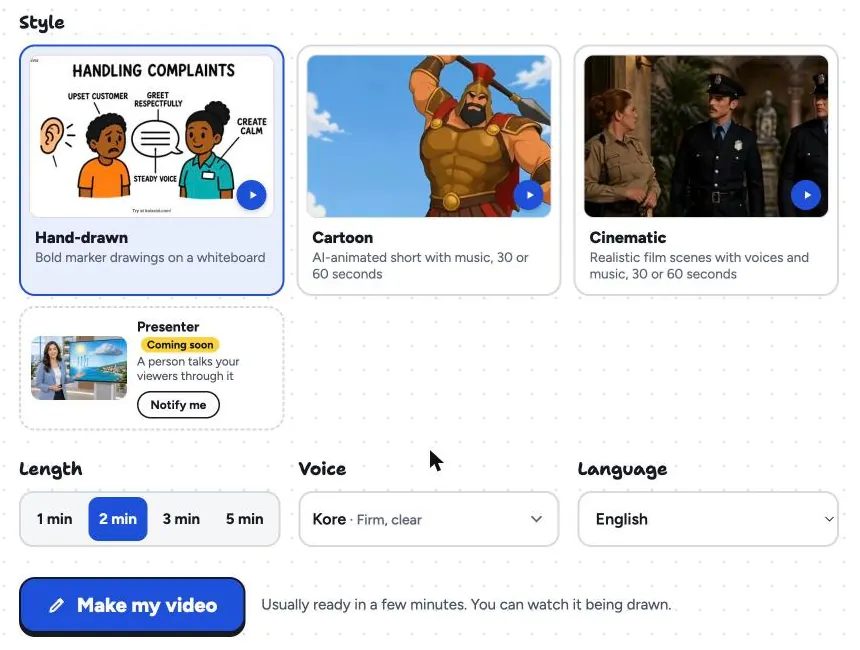
A few tips that follow from the rest of this article:
- Match the length to the job. Choose 1 minute for a homepage or feature explainer, 2 or 3 minutes for a lesson or a training procedure, and 5 minutes only when the topic really needs a longer worked example.
- Match the frame to the channel. Landscape 16:9 for websites and YouTube, vertical 9:16 for Reels and Shorts, square 1:1 for feeds and chat groups.
- Keep your own script to the word count. If you paste a script, it is narrated as written, so use the table above to make sure it fits the length you pick. Our guide on turning a script into a whiteboard video goes into more detail.
- Make a series, not one long video. Five-minute limits are a nudge in the right direction. For a big topic, make one video per question.
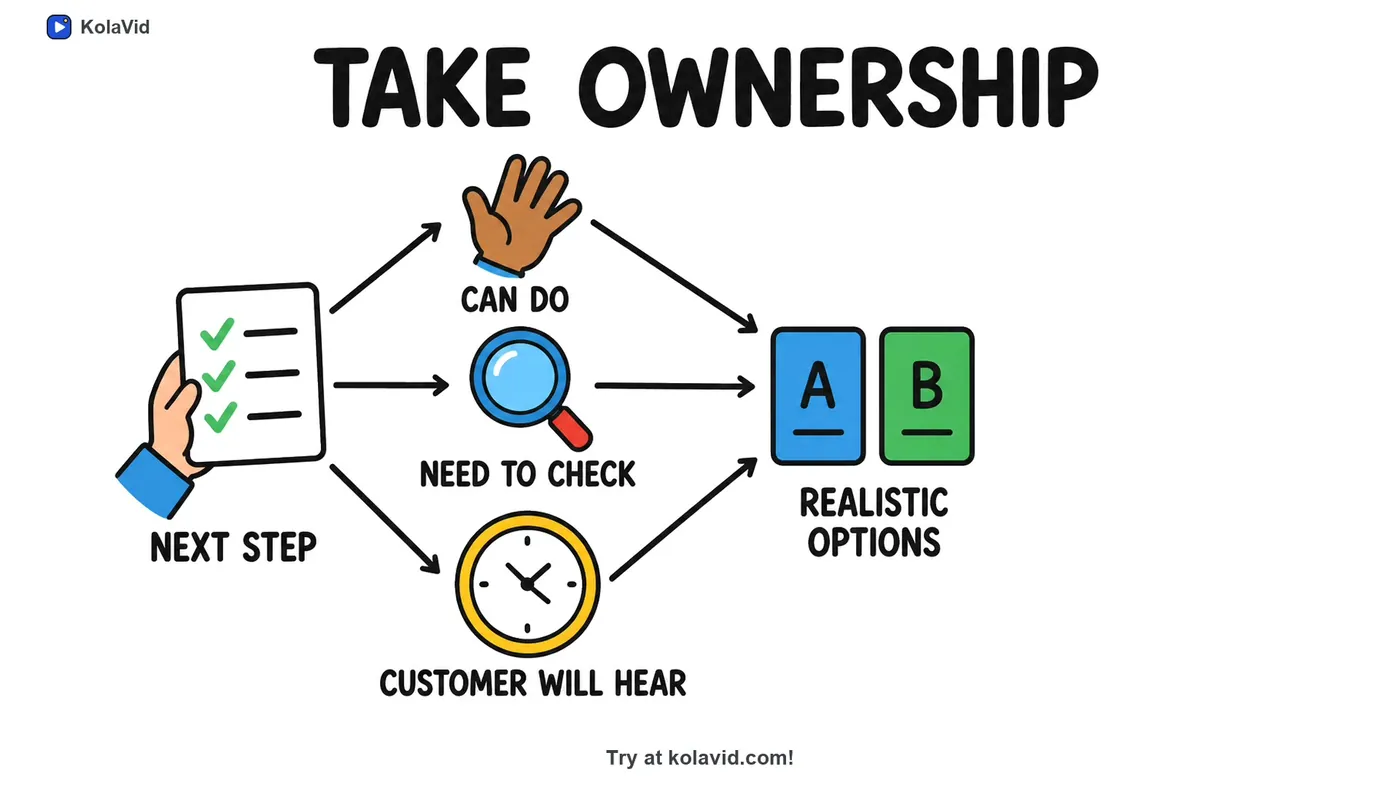
Here is a board from a two-minute sample training video on handling a customer complaint. One step of the procedure, "Take ownership", gets its own board, which is what a short, focused video looks like in practice.
There is no editing timeline, so to change the length you change the script or the setting and make the video again. It is usually ready in a few minutes. The training page has more sample videos.
FAQ
Is two minutes too long for an explainer video?
Not for a lesson, a training procedure or a how-it-works video, where the viewer has chosen to learn. For a homepage or an ad, two minutes is often longer than it needs to be; try 60 to 90 seconds and see whether anything important is lost.
How many words is a 60-second explainer video script?
About 130 to 150 words at a natural speaking pace. Read it aloud with a timer. If you have to rush to fit, cut words rather than speaking faster.
Should I make one long video or several short ones?
Several short ones, when the parts answer different questions or serve different viewers. Keep one longer video only when the steps depend on each other and the viewer has chosen to watch the whole thing.
How long should an explainer video be for YouTube?
Long enough to answer the question in the title fully, which for most teaching topics is 2 to 8 minutes. For a large subject, a playlist of short videos usually works better than one long one.
Does a longer video rank better on YouTube or Google?
Length on its own is not what makes a video useful. A video that answers the search clearly and keeps people watching is the goal, and that is often a shorter one.
Pick the length before you write
Decide what the viewer should do after watching, choose the length from the table, and write to the word count. If you want to test a script without recording anything, a free KolaVid account includes enough credits for one 2-minute video, no card needed.