Training Video Script Template (With 2 Examples)
A training video script template to copy, with two filled examples (a delivery procedure and a software task), word counts per section and read-aloud tips.
Below is a training video script template you can copy straight into a document. It has seven parts, from the opening situation to a one-line recap, and each part has a word budget so a two-minute script stays near 280 words. Under the template you will find it filled in twice, once for a warehouse procedure and once for a software task, plus timing guidance and tips for reading it aloud.
The template (copy this)
Fill the brackets, then delete everything in brackets. The numbers in each heading are rough word counts for a two-minute video.
``` TITLE: [Task, said as an action: "Checking in a supplier delivery"] VIEWER: [Who watches: "New warehouse staff in their first week"] GOAL: After watching, the viewer can [one action you could watch them do]. LENGTH: [1 / 2 / 3 minutes] FRAME: [wide for laptop / tall for phone]
- OPENING SITUATION (about 30 words) [A moment the viewer will recognise. Where they are, what just happened.]
- WHY IT MATTERS (about 30 words) [What goes wrong if this is skipped. A real consequence, not a policy number.]
- THE STEPS (about 25 words each, 3 to 6 steps) Step 1: [Action]. [Reason or what to look for.] Step 2: [Action]. [Reason or what to look for.] Step 3: [Action]. [Reason or what to look for.]
- WATCH OUT (about 30 words) [The most common mistake, and what to do instead.]
- QUICK CHECK (about 15 words) [One question the viewer can answer in their head.]
- RECAP (about 20 words) [The steps again in a few words each.]
- WHERE NEXT (about 15 words) [Who to ask, or which video to watch next.] ```
It works for most training video scripts because it follows the order a new starter's questions come in: what is this, why do I care, what do I do, what could go wrong, and did I get it. For onboarding sets, use the "Where next" line to chain the videos, as in our guide to employee onboarding videos.
How to fill each part
Title and goal. Write the title as the task, not the policy. "Checking in a supplier delivery" is easier to find later than "Goods-In SOP v4". The goal must be something you could watch a person do. If you catch yourself writing "understand", ask what they would do differently once they understand.
Opening situation. Skip "Welcome to this training video". Put the viewer somewhere: "A lorry has just backed up to door two and the driver wants a signature." Ten seconds of recognition keeps people watching.
Why it matters. One consequence they would care about. "If we sign for 40 boxes and only 38 arrived, the store pays for two boxes it never got" lands better than "accuracy is important".
The steps. One action per step, then the reason or the thing to look for. Three to six steps fit in a short video. If you have nine, you probably have two videos.
Watch out. Ask the supervisor which mistake they fix most often. That one sentence often teaches more than the rest of the script.
Quick check and recap. The question makes the viewer recall the steps before the recap answers it. Keep the recap to one breath.

Example 1: a procedure (checking in a supplier delivery)
Here is the template filled in for a stockroom or warehouse. Swap in your own system names and paperwork.
Title: Checking in a supplier delivery Viewer: New stockroom staff, first week Goal: After watching, the viewer can check a delivery against the order, note any shortage or damage, and sign correctly. Length: 2 minutes, wide frame for the training laptop
Opening situation. A delivery van has just pulled up at the back door. The driver is in a hurry and holds out a tablet for your signature. Before you sign, there are four things to do.
>
Why it matters. Your signature says we received everything on that note, in good condition. If anything is missing or broken and you sign anyway, we pay for goods we never got.
>
Step 1. Find the purchase order. Open it on the stockroom scanner or take the printed copy from the tray. You need to know what we ordered, not just what the driver says is on the van.
>
Step 2. Count the boxes against the delivery note. Count them yourself, out loud if it helps. Do not accept the driver's count.
>
Step 3. Check every box for damage. Look for crushed corners, wet patches and broken tape. Open any box that looks damaged.
>
Step 4. Write any problem on the delivery note before you sign. Short, damaged or wrong item, with the quantity. Then sign, and photograph the note.
>
Watch out. The most common mistake is signing first to let the driver go, then counting. Once it is signed, the supplier can say it all arrived. Count first, every time, even when the driver is in a rush.
>
Quick check. A box is wet on one side. What do you do before signing?
>
Recap. Order, count, check, note, then sign.
>
Where next. Next, watch "Putting stock away" to see where each delivery goes.
That is about 230 spoken words, roughly a minute and three-quarters at a calm pace, which leaves room for pauses.
Example 2: a software task (submitting a leave request)
Software scripts need one extra column: what is on screen while each line is spoken.
Title: Booking time off in the HR portal Viewer: All staff Goal: After watching, the viewer can submit a leave request and check that it is pending approval. Length: 1 minute
| Narration | On screen |
|---|---|
| You want next Friday off. Booking it takes about a minute, and your manager sees it straight away. | Calendar with one Friday circled |
| Open the HR portal and select Time off. | Portal home page, Time off highlighted |
| Choose New request, then pick the type. Holiday is the usual one. | Request form, type menu open |
| Set the first and last day. For a single day, both dates are the same. | Date picker, same date twice |
| Add a short note if your manager needs context, then select Submit. | Note box, Submit button |
| Your request now shows as Pending. You will get an email when it is approved. | Request list, status Pending |
| One mistake to avoid: booking flights before the request says Approved. | Plane ticket with a crossed-out tick |
| That is it: Time off, New request, dates, Submit, then wait for Approved. | The five steps in a row |
Say screen labels exactly as they appear, and keep each line to one action, because the viewer is pausing and clicking as they watch.
Timing: how many words fit
Most people read a script aloud at roughly 130 to 150 words a minute. Training scripts should sit at the slower end, because viewers are doing something with what they hear.
| Video length | Script length | Steps that fit |
|---|---|---|
| 1 minute | 130 to 150 words | 2 to 4 short steps |
| 2 minutes | 260 to 300 words | 3 to 5 steps |
| 3 minutes | 390 to 450 words | 5 to 6 steps, or steps plus one example |
| 5 minutes | 650 to 750 words | Usually two topics; consider splitting |
For a two-minute script, a balanced split looks like this: opening and why it matters take about 25 seconds, the steps take about 70, and the watch-out, check and recap share the last 25. If the steps need more room, shorten the opening first, never the warning.
Read-aloud tips before you record
A script that reads well on paper can still trip you up out loud. Read it aloud once, start to finish, before anyone records or generates anything.
- Mark where you run out of breath. That sentence is too long. Split it.
- Write numbers the way they are said. "Two to three working days" is easier to say than "2-3 WD".
- Spell out or explain acronyms the first time. "The PO, the purchase order" costs three words and saves confusion.
- Cut "as you can see" and "basically". They add time and say nothing.
- Use "you" and the present tense. "You count the boxes", not "boxes should be counted".
- Time yourself with a phone. If you go over, cut words, do not speak faster.
- Hand it to someone who does the job. Ask them to read it aloud too. Where they stumble or frown is where the script is unclear or wrong.
If you are turning an existing procedure document into a script, our guide to turning an SOP into a training video covers rewriting numbered clauses into spoken steps. For the full production process, from goal to publishing, see how to make a training video.
Turning the finished script into a video in KolaVid
Once the script is written, you can record it yourself over slides or a screen recording, or have it turned into a drawn video. In KolaVid you paste the script into the box on the first screen, choose a frame (Wide 16:9, Tall 9:16 or Square 1:1) and a length, and it becomes a narrated whiteboard video, with each drawing appearing as the narrator says it and one idea on each board. Paste only the words you want spoken; keep the "On screen" column and your bracketed notes out of it.
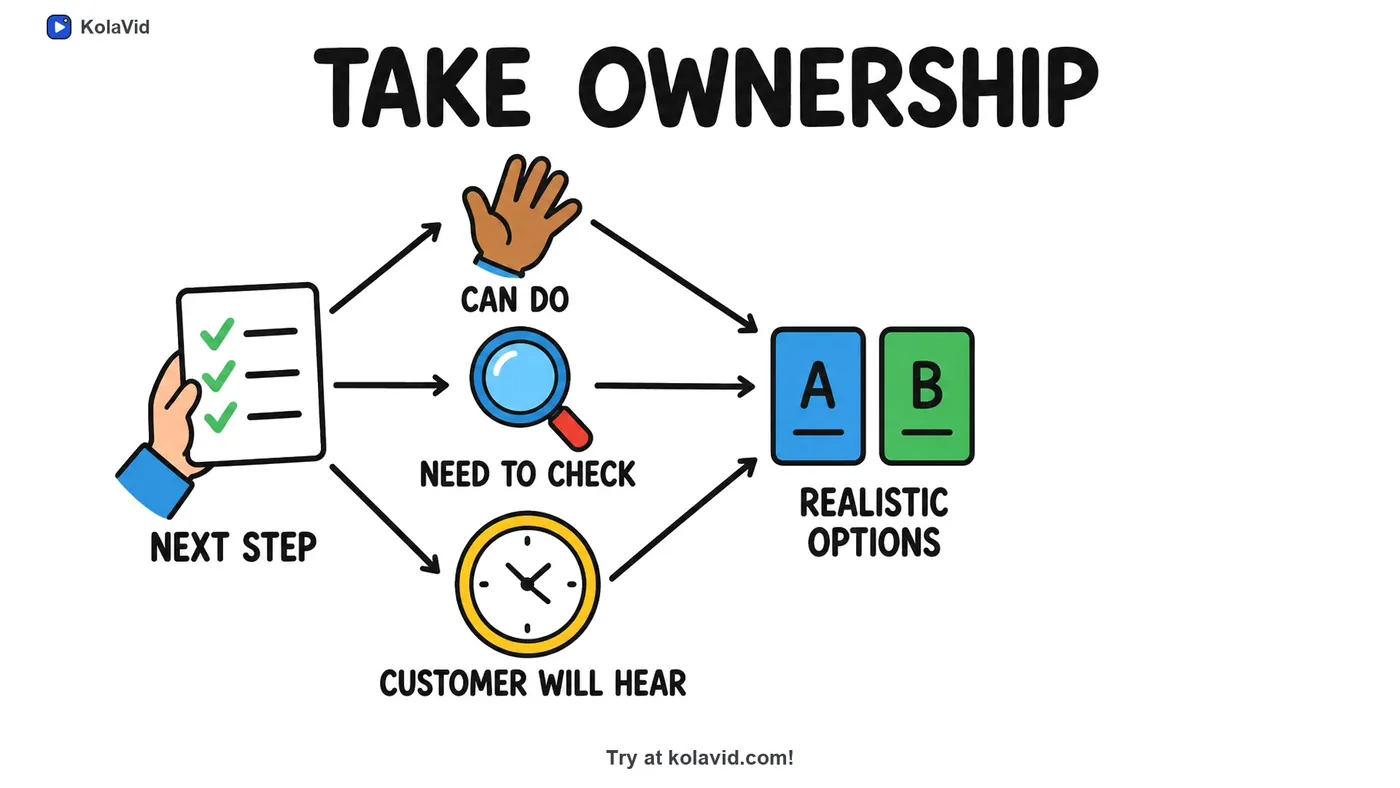
The template's structure suits this format well, because each step becomes its own board. Here is a frame from a sample training video built from a complaint-handling procedure: one step, "Take ownership", turned into a single board.
A drawn video is a good fit for Example 1, where the viewer follows a sequence. For Example 2, a real screen recording is usually better, because people need to see the actual buttons. Free videos run up to 2 minutes and paid plans go up to 5. You download the MP4 or share a link; there is no editing timeline, so to change a line you edit the script and make the video again. The training page has sample videos, and our guide on turning a script into a whiteboard video shows how scripts are handled in more detail.
FAQ
How long should a training video script be?
About 130 to 150 words for every minute of video. A two-minute training video script is roughly 260 to 300 words. If yours is past 700 words, it likely covers more than one task and reads better as two videos.
Should I write a full script or just bullet points?
Write a full script if anyone else will record it, or if you will use text-to-speech or an AI tool. Bullet points work for a confident presenter recording themselves, but they tend to produce longer videos with more "um" and repetition.
Do I need a two-column script with visuals?
For software training, yes: the "On screen" column keeps the voice and the clicks in step. For procedures and soft skills, a single narration column is usually enough, with a note in brackets wherever a specific picture matters.
Start with the task people ask about most
Pick the procedure your team asks about most often, copy the template, and fill it in within the word budget. Read it aloud once, fix where you stumble, and you have a script ready to record. If you would like to see it as a drawn video first, a free KolaVid account includes enough credits for one 2-minute video, no card needed.