AI Video Generator Pricing: Credits, Minutes and Plans
AI video generator pricing explained: how credits, minute allowances, download limits and subscriptions work, and how to compare cost per finished minute.
AI video generators charge in a handful of ways: a subscription with a monthly allowance of minutes or credits, a limit on how many videos you can download, pay-as-you-go minutes, or credits that only cover the AI features inside an editor. The headline monthly price tells you little on its own. To compare tools fairly, work out the cost per finished minute of video you can actually use, after watermarks, length caps and remakes.
This guide explains each pricing model, the limits that hide in the small print, and a worked comparison. Tool prices were checked on each vendor's own site on 28 October 2026; they change often, so confirm before you buy.
The main AI video pricing models
| Model | What you are counting | Example (checked 28 October 2026) | Watch out for |
|---|---|---|---|
| Credits per second or minute | Seconds or minutes of finished video | KolaVid: 1 credit a second of whiteboard video. Golpo AI: 1 credit a minute | What one credit buys differs between tools; remakes use credits again |
| Monthly minute allowance | Minutes of video a month on a plan | Golpo AI Starter: $39.99 a month for 20 minutes | Per-video length caps inside the allowance |
| Download or export limit | Finished files you can export a month | VideoScribe Lite: £130 a year, 5 downloads a month | Long build time per video is your cost, not theirs |
| Pay as you go | Minutes bought one at a time | Golpo AI: $7.99 a minute for 5 to 19 minutes, less at higher volumes | Higher price per minute than a plan |
| Editor subscription with AI credits | A seat in the editor, plus credits for AI features | Powtoon and Animaker paid plans include AI credits | AI credits and video exports are counted separately |
Most tools mix two of these. A subscription might include a minute allowance and also cap each video's length; an editor might charge per seat and also meter its AI voice.
How credits work, and why they are hard to compare
"Credits" is the word that confuses buyers most, because it means something different in every tool.
- In KolaVid, one credit is one second of whiteboard video. A 2-minute video uses 120 credits.
- In Golpo AI, one credit is one minute of video.
- In Powtoon and Animaker, credits pay for AI features such as generated scripts, voices or clips inside the editor. Exporting a video is a separate limit.
So "5,000 credits" and "20 credits" can buy similar amounts of video, or very different amounts. Always translate credits into minutes of finished video before you compare.
Three questions to ask about any credit system:
- What exactly does one credit buy? Seconds of video, minutes, an AI image, a voice line?
- Does a remake cost credits again? In most generators, a new version is a new video, so yes. Budget for some remakes.
- Do unused credits roll over? Policies differ. Check the terms before you buy a large plan.
How to compare cost per finished minute
Use one formula for every tool:
Cost per finished minute = monthly price ÷ minutes of usable video the plan gives you
"Usable" is the important word. A free video with a watermark you cannot use at work counts as zero. A plan that caps videos at two minutes is fine for short explainers and useless for a ten-minute lesson.
For editors, add a second line: your time. A tool that costs less but needs three hours of scene building per video can cost more in total than a generator.
A worked comparison
Here is the cost per minute for the entry plans of three tools that publish clear numbers, checked on 28 October 2026. Plans differ in what they include, so read the notes column.
| Tool and plan | Price | Video included | Cost per finished minute | Notes |
|---|---|---|---|---|
| KolaVid Starter | $19.99 a month | 5,000 credits, about 83 minutes | About $0.24 | Videos up to 5 minutes; generated, no editor |
| Golpo AI Starter | $39.99 a month | 20 minutes | About $2.00 | Videos 30 seconds to 2 minutes, black and white; discounts for yearly billing |
| Golpo AI pay as you go | $7.99 a minute (5 to 19 minutes) | What you buy | $3.99 to $7.99 | Price per minute falls with volume |
| VideoScribe Lite | £130 a year (about £10.83 a month) | 5 downloads a month, up to 5 minutes each | From about £0.43 (five 5-minute videos) | You build each video by hand; time not included |
The VideoScribe figure is a best case: it assumes you use all five downloads at the full five minutes. Five 2-minute videos would cost about £1.08 a minute. Powtoon and Animaker are editors priced per seat with AI credits on top, so a per-minute figure would mislead; see their pricing pages, and count your editing time.
The numbers show why the cheapest plan is not always the cheapest video. They also show what they leave out: drawing style, editing control and languages, which may matter more to you than a few cents a minute. Our buying guide to AI whiteboard tools covers those.
Hidden limits to check before you pay
Most surprises come from limits that sit below the price. Check each of these on the plan you would buy:
- Watermarks. Free plans usually mark exports. Some paid plans mark premium assets too; VideoScribe's Lite plan, for example, lists watermarks on premium images.
- Download rules. Some free videos cannot be downloaded at all, only watched or shared from the tool. Golpo AI's free video is one example.
- Length caps per video. Separate from the monthly allowance. Golpo AI Starter allows videos up to 2 minutes; VideoScribe Lite up to 5; Powtoon Lite up to 10 (checked 28 October 2026).
- Export resolution. Free plans often export at lower quality; Powtoon's free plan, for example, exports at 720p.
- Features gated by plan. Colour, extra languages, AI voice minutes or style options may sit on higher tiers. Golpo AI lists colour from its Growth plan and 45+ languages from Creator; VideoScribe includes AI voiceover minutes on Core and Max, not Lite.
- Paid edits. Some generators include a set number of edits per video and charge for more.
- Yearly prices shown as monthly. "$15 a month" may mean billed yearly. Check the monthly-billing price before you compare.
- Commercial use. Some free plans do not allow commercial use. Check if the video is for a business.
- Seats. A per-user price multiplies fast for a team.
A worked monthly budget
Say you are a trainer who needs eight 2-minute training videos this month, and you expect to remake two of them after review. That is ten videos, or 20 minutes of finished video.
- KolaVid: 20 minutes is 1,200 credits. Starter's 5,000 credits cover it with plenty left over.
- Golpo AI: Starter's 20 minutes covers it exactly, with no room for a third remake; each video must stay within the 2-minute cap.
- VideoScribe: Lite's 5 downloads a month would not be enough for ten videos. Core allows 30 downloads a month. Count the hours to build each video as well.
Then do the same sum for the videos you will really make. A school making one lesson video a week, a marketer making four feature videos a quarter and an agency making forty client videos a month will land on different plans, and sometimes different tools.
For the wider question of what an explainer costs with an agency or freelancer versus a tool, see our guide to explainer video cost.
KolaVid pricing in detail
KolaVid makes narrated whiteboard videos from a typed topic, a pasted script, a PDF, Word, PowerPoint or text file, or a web link. Its pricing is one rule: one credit per second of whiteboard video.
- Free account: 120 credits, enough for one 2-minute video. No card needed. Free videos carry a small KolaVid mark and run up to 2 minutes.
- Starter: $19.99 a month for 5,000 credits. That is about 83 minutes of whiteboard video, or roughly 40 two-minute videos.
- Creator and Studio: more credits a month for people who make more videos.
- Length per video: 1, 2, 3 or 5 minutes. Paid plans go up to 5 minutes.
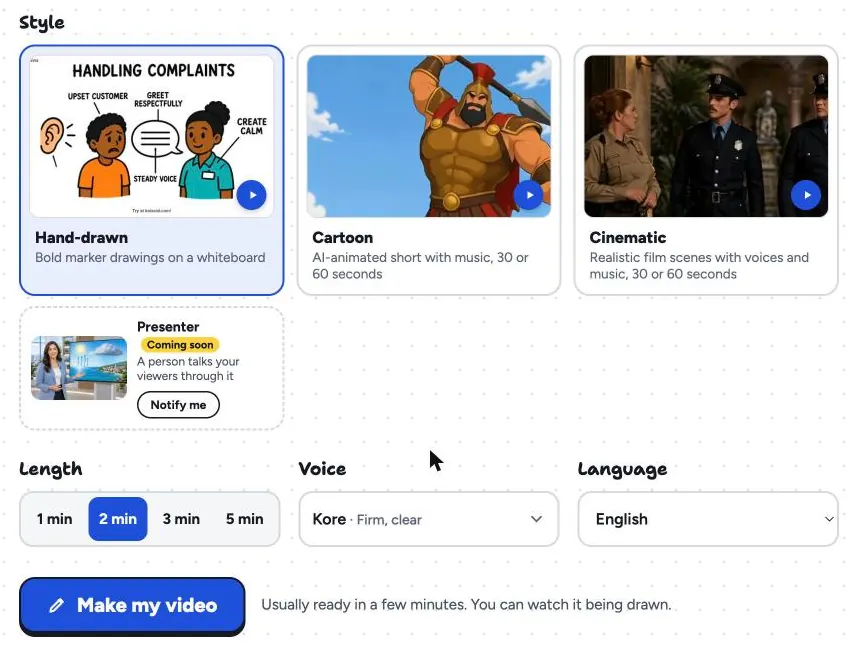
The length button is the cost control. A 1-minute video uses about 60 credits, a 3-minute one about 180 and a 5-minute one about 300, so you can estimate the cost of a month's videos before you make any.
Limits to know before you buy: there is no editing timeline, so changing a video means making it again, which uses credits again. There are no team seats or avatars. Every plan downloads an MP4 or shares a link, in 16:9, 9:16 or 1:1. If your work needs heavy editing, a tool with an editor may cost more per minute but less in frustration. The whiteboard video maker page has sample videos so you can judge the output before you spend anything.
Questions to ask before you subscribe
- How many minutes of finished video do I need in a normal month, including remakes?
- What does one credit, download or minute buy in this tool?
- What is the longest single video my plan allows?
- Will my exports have a watermark, and at what resolution?
- Are the features I need (colour, languages, voices) on this plan or a higher one?
- Is the price I am looking at billed monthly or yearly?
- How many hours of my own time will each video take?
Answer them for two tools, and the choice usually makes itself. If you are not sure how long your videos should be, start with our guide on explainer video length, because length drives the cost on almost every plan.
FAQ
How much does an AI video generator cost per minute?
It varies widely by tool and plan. Using entry plans checked on 28 October 2026, KolaVid Starter works out at about $0.24 a minute of whiteboard video and Golpo AI Starter at about $2.00 a minute. Editors such as VideoScribe and Powtoon are priced by downloads or seats, so your own editing time is part of the cost.
Are credits better than a monthly subscription?
Neither is better in general. Credits tied to seconds or minutes make cost easy to predict per video. Subscriptions with download limits suit people who make a few polished videos. What matters is the cost per usable minute for the number of videos you actually make.
Do free AI video generators add a watermark?
Most free plans do. Powtoon, Animaker and Golpo AI mark free exports, and VideoScribe's trial downloads are watermarked. KolaVid's free videos carry a small KolaVid mark.
Do unused AI video credits roll over?
It depends on the tool and the plan. Check the terms or ask the vendor before buying a large plan, especially if your video needs vary from month to month.
Why does remaking a video cost credits again?
In most generators, a remake is a new video: the tool writes, draws and narrates it again. Plan for one or two remakes per video while you learn how to write a good prompt or script.
Price your next month of videos
List the videos you will make, add a remake for every few, and turn that into minutes. Then divide each tool's price by the minutes it gives you. If you want to see KolaVid's output before doing the sums, a free account makes one 2-minute video with no card. VideoScribe, Powtoon, Animaker and Golpo AI are trademarks of their owners; KolaVid is not connected with them.