Customer Onboarding Videos: The First 5 to Make
Plan customer onboarding videos that get new customers to their first result: welcome, first setup, first win, common questions and what next, with outlines.
A customer onboarding video helps a new customer get their first real result from what they bought, quickly and without calling support. The best approach is a small set of short videos, not one long tour: a welcome, the first setup, the first win, answers to the questions everyone asks, and what to do next. Each one is two minutes or less and turns up at the moment the customer needs it.
Below: how to find the "first win" your videos should lead to, the five videos to make first, script outlines you can copy, where to put each one, and how to tell whether they are working. The examples cover software, a physical product and a service, because the method is the same.
Customer onboarding is not staff onboarding
Staff onboarding teaches a new employee how your company works. Customer onboarding has a narrower job: get someone who has just paid you to the point where the product is clearly worth it. That changes the videos.
- They are shorter. A customer owes you no time. If the video does not help in the first few seconds, they close it.
- They start from the customer's goal, not your features. Nobody buys a booking app to "explore the dashboard". They buy it to stop missing appointments.
- They are optional. A customer can skip them, so each video has to earn its place.
If you are planning videos for new hires instead, see our guide to employee onboarding videos, which builds a first-week set for staff.
Start with the first win
Before you script anything, write down the first moment your customer gets value. That moment is what every onboarding video points at.
| What they bought | The first win |
|---|---|
| An online booking tool for a hair salon | The first client books an appointment online without a phone call |
| An espresso machine | The first good cup, without a sour or watery shot |
| A bookkeeping service for freelancers | The first month's receipts sent and categorised |
| A project management app for a small team | One real project with tasks assigned to two people |
| A gym membership | The first workout done with the right settings on the machines |
Then list what stands between sign-up and that moment. For the salon booking tool it might be: add services and prices, set opening hours, connect a calendar, share the booking link. Those steps are your setup video. Everything else (reports, integrations, advanced settings) waits until the customer has had the first win.
A useful check: ask your support team which questions they hear in a customer's first two weeks. Those questions mark where people get stuck before the first win.
The five customer onboarding videos to make first
| Video | When the customer sees it | Length | Its one job |
|---|---|---|---|
| 1. Welcome | In the welcome email, on the first screen after sign-up, or on a card in the box | 45-60 seconds | Say what happens next and how long it takes |
| 2. First setup | Right before the setup steps | 1.5-2 minutes | Get the essentials done in the right order |
| 3. First win | Straight after setup | 1.5-2 minutes | Walk through the first real use, start to finish |
| 4. Common questions | In the help centre and in support replies | 1-2 minutes each | Answer one question that blocks progress |
| 5. What next | A week or two in, once the first win has happened | 1-2 minutes | Show the next most useful thing to try |
Make them in that order. If you only have time for one, make the first-win video, because it carries the customer to the point where they decide to stay.
Script outlines you can copy
Speech runs at roughly 130 to 150 words a minute, so a one-minute video is about 140 words. Write as you would talk to a customer at the counter: short sentences, "you", and the exact names of buttons and parts they will see.
Video 1: Welcome
- Thanks, in one line. "Thanks for choosing us. Here is how to get your first client booked this week."
- What happens next. Three steps in plain words, and roughly how long they take: "Setup takes about ten minutes."
- Where to get help. One place, said clearly: the chat button, a phone number, the help page.
- The next action. "Open the setup video below and do it with me."
Leave out the company history and the feature list. A welcome video that explains the plan beats one that sells the product again.
Video 2: First setup
- What you will have at the end. "By the end of this video, your booking page is ready to share."
- The steps, in order, each with the reason. "Add your services first, because clients choose a service before a time."
- The one setting people get wrong. For the salon tool, maybe time zones or buffer time between appointments.
- How to check it worked. "Open your booking link on your phone. If you see your services, you are done."
For software, a drawn explainer works well for the order and the reasons, and a short screen recording for the exact clicks. Our software tutorial guide covers when to use which.
Video 3: First win
- The situation. "A client wants a cut on Saturday morning."
- Follow one example from start to finish. The client opens the link, picks the service and time, gets a confirmation; you get a notification and the slot is blocked.
- What to do if it goes wrong. "If the time shows as unavailable, check your opening hours."
- Celebrate the result. "That's your first online booking, and you didn't pick up the phone."
For a physical product, the first-win video is the first proper use. For the espresso machine: fill the tank, warm up, grind, tamp, pull a shot, and what a good shot looks like compared with a sour or watery one. Our guide to product education videos has more on explaining physical products.
Video 4: Common questions (one per video)
- The question, in the customer's words. "Why can't clients see Sunday?"
- The short answer. "Sunday is switched off in your opening hours."
- How to fix it. The two or three steps.
- How to avoid it next time. One line.
One question per video keeps each one short and easy to link from a support reply. Name the video with the question itself, so it shows up when customers search your help centre.
Video 5: What next
- Recognise progress. "You have had your first bookings. Here is how to get more."
- One next step, not five. For the salon: add the booking link to your social profiles.
- Why it helps, with a concrete example.
- Where to find more, such as the help centre or a short video library.

Where to put each video
A good onboarding video nobody finds does nothing. Put each one where the customer already is at that moment:
- The welcome email and the first screen after sign-up, for videos 1 and 2.
- Empty states in the product. A blank calendar or project list is the perfect place for the first-win video.
- A QR code on the packaging or quick-start card, for physical products. It is read at exactly the right moment.
- The help centre, with each common-question video next to the written answer.
- Support replies. When an agent answers a question that has a video, the reply links to it.
- A follow-up email a week or two in, for the what-next video.
Choose the frame by where people watch. Landscape suits a help centre and a laptop; vertical or square suits a phone held over a kitchen counter or a gym machine.
How to tell whether they work
View counts tell you the video was opened, not that it helped. Better signals:
- Fewer "how do I" questions in the first two weeks, on the topics the videos cover.
- More customers reaching the first win, if you can see it: a first booking, a first project, a first export.
- What support still hears. Each repeated question is either a missing video or a video that needs a clearer step.
- Customer comments. Ask one question after the first-win video: "Did this get you there?"
Keep each video's script in a shared document. When the product, the packaging or a setting changes, update the script and remake the video that week, because a video that shows an old screen or step creates support questions instead of preventing them.
Making customer onboarding videos with KolaVid
KolaVid turns a prompt, pasted text or script, a document (PDF, Word, PowerPoint or text file) or a web link into a narrated whiteboard video, with each idea drawn as the narrator says it. That suits the order-and-reason parts of onboarding: what happens next, why the setup steps go in this order, and what a good result looks like.
To make the first-win video, paste your outline and add a line about the viewer: "Customer onboarding video for salon owners who just signed up. Friendly and practical. End with how to check the booking worked." You can also attach your existing help article or quick-start guide with Add a document, or add the link to your help page.
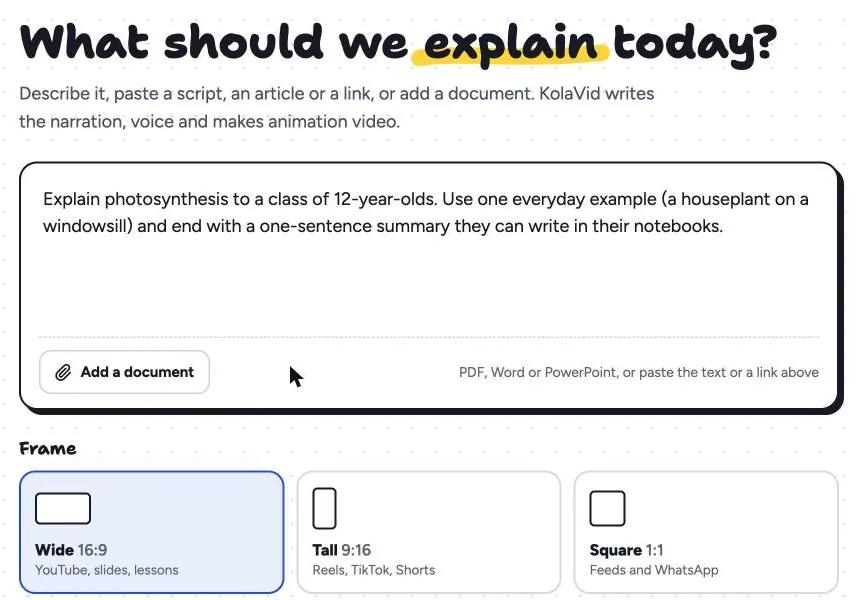
Choose the frame (landscape 16:9 for the help centre, vertical 9:16 or square 1:1 for phones), a female or male voice and the narration language. The video is usually ready in a minute or two; download the MP4 for your help centre or email, or share a link. Free videos run up to 2 minutes, which covers every video in this set.
Two honest limits: KolaVid makes drawn explainers, not screen recordings, so for exact clicks in your product you will still want a short screen capture. And there is no editing timeline, so when your product changes you update the script and make the video again. The marketing page has more examples for customer-facing videos.
FAQ
How long should a customer onboarding video be?
Under two minutes for most videos, and under a minute for the welcome. If a setup video runs longer, split it at a natural checkpoint, such as "your account is ready" and "your first client is booked".
Should I make one onboarding video or several?
Several short ones. Each step of onboarding happens at a different moment, and a customer looking for help with one step will not scrub through a ten-minute tour to find it. A set also lets you update one video without remaking all of them.
What should a customer welcome video include?
A thank-you in one line, the two or three steps to the first result, how long they take, where to get help and the next action. Leave the company story and the feature list for your website.
Do onboarding videos replace written help articles?
No, they work best together. The video shows the order and the reasons; the article holds the details people want to copy, such as settings and exact wording. Link each one to the other.
Start with the first win
Write down the moment your customers first get value, list the steps in the way, and make the first-win video this week. If you want to try it without recording anything, a free KolaVid account includes one 2-minute video with no card. Paste your outline, choose the frame, and send it to your next new customer.