How Long Should a Training Video Be? Lengths by Type
How long should a training video be? Lengths by type, word counts per minute of script, how to split long material into a series, and signs a video is too long.
Most training videos should run between one and five minutes, and the right length depends on the job the video does. A software task needs one to two minutes, a procedure two to three, and a policy topic three to five. If your video runs much longer than that, it almost always covers more than one task and works better as a short series.
These are working guidelines, not laws. The better question is "how much does this one task need?", and the answer comes from your script, not the clock. Below: lengths by type, the arithmetic to turn length into words, a worked example of splitting long material, and the warning signs that a video has grown too long.
Recommended lengths by type
| Type of training video | Typical length | Why |
|---|---|---|
| Software task ("how to log a ticket") | 1-2 minutes | One task, a few clicks; people watch it while doing it |
| Procedure ("receiving a delivery") | 2-3 minutes | A handful of steps, the reasons, one common mistake |
| Policy or compliance module | 3-5 minutes | A scenario, the right action, the reason and a grey area |
| Safety procedure | 2-4 minutes | Steps plus the "stop and ask" moments; no room for padding |
| Concept explainer ("how our pricing works") | 2-4 minutes | One idea explained with one example |
| Welcome or culture video | 1-3 minutes | Sets the tone; detail lives elsewhere |
Two things push a video towards the short end: viewers watching on a phone between tasks, and a topic they will rewatch at the moment of need. Two things push it longer: a scenario that needs setting up, and a decision with genuine grey areas worth discussing.
The words-per-minute arithmetic
Length starts as a word count. A clear, unhurried speaking voice runs at roughly 130 to 150 words a minute. That gives you a simple budget:
| Video length | Words of script |
|---|---|
| 1 minute | 130-150 |
| 2 minutes | 260-300 |
| 3 minutes | 390-450 |
| 5 minutes | 650-750 |
Most people are surprised how small these numbers are. A two-minute video is about the length of four short paragraphs. If your script for "one procedure" is 1,200 words, you are looking at a video of about eight or nine minutes, and that is your first signal to split it.
Adjust for three situations:
- Screen recordings have silences while the cursor moves and pages load. Plan for fewer words per minute, closer to 100.
- Viewers working in a second language follow a slightly slower pace more easily. Aim for the lower end of the range and shorter sentences.
- Technical terms and numbers take longer to absorb than to say. Give each one a moment on its own.
The quickest test is to read your script aloud with a timer. If you run out of breath on a sentence, split it.
Why one task per video sets the length
The most reliable way to get the length right is to stop thinking about length. Give each video one task or one decision, and the length mostly sorts itself out.
A video about "using the till" has no natural end. A video about "processing a refund at the till" does: once the refund is processed and the receipt is handed over, the video is finished. One task has a start, a few steps and an end, which is why procedure videos naturally land at two or three minutes.
This also makes videos easier to find. When a new starter forgets how to do a refund, a video titled "Processing a refund" can be found in seconds. Finding the refund section inside a twenty-minute "Till training" video means scrubbing back and forth. For more on choosing topics, see our guide to training videos for employees.
How to split long material into a series
Say your café has a six-page new starter induction document, and someone has suggested turning it into "the induction video". Read aloud, it would run well over twenty minutes. Here is how to split it.
Step 1: List the actions. Go through the document and write down every heading that describes something a new starter does or decides. Ignore background paragraphs for now.
Step 2: Group by moment of need. Put together actions that happen at the same time, done by the same person. Opening the café and closing it are different moments, so they are different videos.
Step 3: Put safety and day-one items first. These are the videos a new starter needs before their first shift.
Step 4: Give each video a task title and a length.
The result might look like this:
- Your first shift: where things are and who to ask (2 min)
- Fire alarm and first aid: what to do (2 min)
- Food allergies: how to answer a customer's question (3 min)
- Handwashing and when to change gloves (1 min)
- Using the coffee machine safely (2 min)
- Taking payment and processing a refund (3 min)
- Closing the café: the checklist (3 min)
Seven videos, about sixteen minutes in total, and each one can be watched, rewatched and updated on its own. The background paragraphs you set aside? Most of them belong in the written handbook, where people can look them up.

Name the series clearly and keep the numbering, so people can see where they are. If you are building a compliance series, the same method applies; our guide to compliance training videos shows how to turn one policy into short modules.
Signs your training video is too long
You do not always need viewing data to know a video has grown too long. Watch for these signs while you write and review:
- The title has "and" in it. "Receiving deliveries and stock rotation" is two videos.
- You need a contents slide. If the viewer needs a map, the video covers too much.
- The recap has more than three points. A long recap is a sign of a long list of topics.
- People ask questions the video answers. If they watched it and still ask, the answer was probably buried in the middle.
- Reviewers skim. If the subject expert says "looks fine" without commenting on anything after the first minute, viewers will skim too.
- The script has a "Part 2" heading. It is already telling you where to cut.
The opposite problem exists too. A video is too short when it lists steps without the reason for the one people skip, or names a rule without showing what it looks like at work. If the common mistake keeps happening after the video, add the missing reason before you add anything else.
When a longer training video is fine
Some training videos are better long. A recorded live session where the questions are part of the value, a detailed walkthrough of a complex system for specialists who will use it every day, or an expert talk that people choose to watch: none of these need to be cut to three minutes.
What they need instead is structure. Add chapter markers or a written list of timestamps, so viewers can jump to the part they need. Keep the short, single-task videos alongside them for the everyday "how do I" questions. The two formats do different jobs. Our article on short vs long explainer videos covers that trade-off in more depth.
Planning lengths in KolaVid
If you make training videos with KolaVid, the length is a setting you choose before the video is made: 1, 2, 3 or 5 minutes. Free videos run up to 2 minutes, and paid plans go up to 5. KolaVid writes the narration, so you can paste a procedure and choose 2 minutes, or paste a policy section and choose 5. The word budget above still helps: if your pasted text is far longer than the length you picked, split it first.
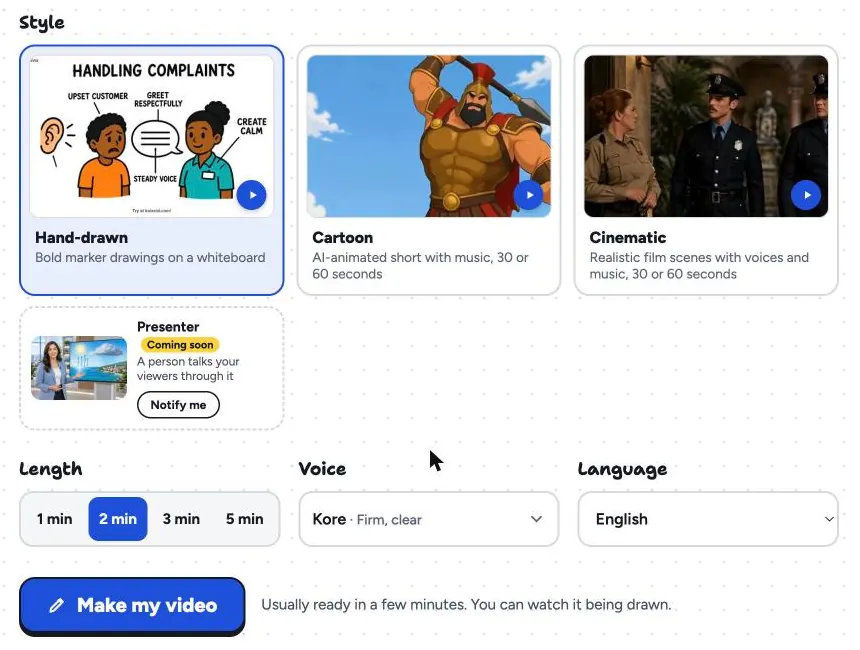
The length also sets the cost. Whiteboard videos use 1 credit a second, so a 2-minute video uses 120 credits and a 3-minute one uses 180. The Starter plan's 5,000 credits a month cover about 83 minutes, which is the café series above five times over. If your material needs more than 5 minutes, that is the cue to split it into a series, which tends to be the better video anyway. The training page has sample videos at different lengths, and our step-by-step guide on how to make a training video covers the rest of the process.
FAQ
What is the ideal length for a training video?
For most single tasks, two to three minutes. Software tasks can be shorter, around one to two minutes; policy and compliance modules can run three to five. Choose the length that fits one task with its reasons, rather than a fixed number.
How many words is a 5-minute training video script?
About 650 to 750 words at a clear speaking pace of 130 to 150 words a minute. Screen recordings with pauses need fewer words, and audiences working in a second language follow a slightly slower pace more easily.
Is a 20-minute training video too long?
For a single procedure, yes. Split it into one video per task. For a recorded live session or a specialist deep-dive, a long video can work if it has chapters or timestamps so people can jump to what they need.
Should every training video be the same length?
No. Keeping a series consistent in style and structure helps, but each video should be as long as its task needs. A one-minute software tip and a four-minute policy module can sit happily in the same library.
Write the script first
Pick a training topic, write the script, and count the words before you think about anything else. If it runs past 750 words, split it. If you want to see how a two-minute version looks as a narrated whiteboard video, a free KolaVid account includes one, no card needed.